Nobody plans for this. The business starts with a website maybe something knocked together quickly, fine for the time and then one day there’s a request for a booking widget. Then a client login. Then a spreadsheet that one particular person updates every Thursday because, well, they just do, and nobody’s quite sure what would happen if they were off sick.
Six months later, the same customer’s address exists in three places and none of them quite match. Someone caught a discrepancy last week, fixed two of them, forgot the third.
By that point the website isn’t really the problem. It’s everything held together around it.
And that distinction matters more than it sounds, because it changes the question entirely. Not “which plugin should we try next?” but something harder: should this process be its own piece of software?
The first warning sign is usually boring: duplicate work
The clearest early signal is rarely dramatic. It’s retyping. Someone gets a lead through the contact form and copies the details into a spreadsheet. That same information gets entered into the CRM later. If a sale goes through, it might get keyed in again somewhere else accounting, stock, project tracking, whatever the business uses.
Each passthrough is another opportunity for a digit to be wrong, a phone number to be six months out of date, a follow-up to slip through. But the bigger issue, honestly, is what happens to confidence in the data over time. When two systems are showing different things, someone has to make a call about which one to trust. Usually they go with whichever one was touched most recently, or whichever one the longest-serving person swears by. That’s not a system. That’s just managed uncertainty.
What a proper web application does here is relatively simple in concept: capture the information once, validate it at the point of entry, and move it automatically between systems through APIs. No manual handoffs. The data gets where it needs to go without anyone touching it again.
The moment users need to log in, the project changes shape
Public website versus a system where people actually sign in and do work: there’s a meaningful gap between those two things, and it’s easy to underestimate until you’re already building.
Once logins exist, everything gets more complicated. A customer should only see their own orders, not someone else’s sitting in the same database. A regional manager might see records for the locations they run but nothing outside them. Finance can approve a refund but probably shouldn’t be editing product listings. Someone in admin needs a history of who changed what and when, in case something goes wrong and blame needs to be assigned.
None of that is cosmetic. Each of those rules touches the database structure, the interface logic, the security model, the testing approach, and what support looks like once it’s live. You genuinely cannot just “add permissions later” without rebuilding large parts of what you already have. This is architecture-level stuff, not an afterthought.
The actual clue is in the exceptions, not the main process
Generic software usually handles the standard case reasonably well. What it struggles with is the exception. And most businesses, when you look closely, run largely on exceptions.
Pricing that varies based on customer category and order size combined. Quotes above a certain threshold that need a specific person to sign off. One warehouse that can ship a particular product, another that can’t, for reasons that made sense three years ago and now just are what they are. Dealer margins that vary by territory in ways that don’t map neatly to any dropdown.
These don’t live in the software. They live in people’s heads, in WhatsApp threads, in a tab on a spreadsheet that someone once named “SPECIAL CASES” in capital letters as a kind of warning. When these exceptions are both common and consequential, when getting them wrong actually costs the business, forcing everything into generic software starts to look less like a cost-saving measure and more like an ongoing tax on everyone who has to work around it.
Integrations are where projects quietly get a lot harder
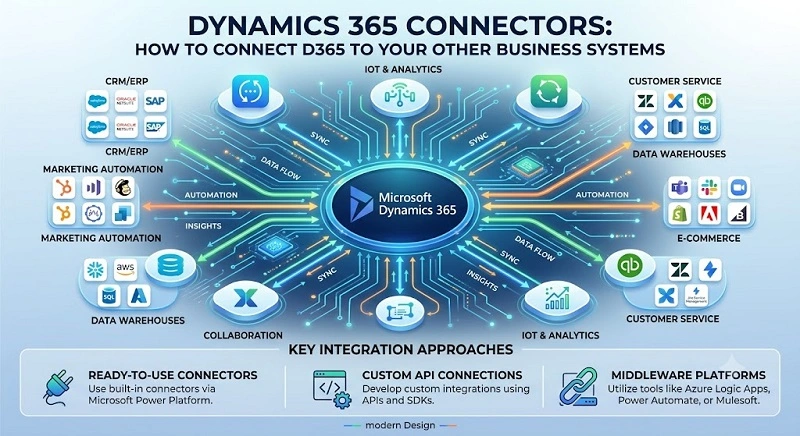
Most business applications don’t operate in isolation. At some point there’s a payment gateway, a CRM, an accounting platform, a shipping API, email notifications, WhatsApp messaging, maybe an ERP, maybe a legacy database nobody wants to touch but nobody’s willing to decommission either.
Getting the first API call to work is, genuinely, the easy part. Where things get complicated is in everything around it. What does the system do when the external service is running slowly? When it sends back a field you weren’t expecting? When a payment goes through on the provider’s side but the confirmation times out before it reaches yours, leaving you with no idea whether it succeeded or not?
Retry logic, idempotency, validation, failure states, logging, access control this is what separates a working demo from a system a business can actually rely on Monday morning. None of it is glamorous. All of it matters.
A well-built application eliminates status-chasing
A lot of internal processes run mainly on people asking each other where things are. “Has this been approved?” “Did the customer upload that document?” “Who’s looking after this lead?” “Was the payment confirmed?” “Why is this still showing as pending?”
When these questions are constant, it’s because the system isn’t showing people what they need to see. Someone is filling the gap, usually whoever gets pulled into the most conversations. A decent portal or internal dashboard can answer these questions without anyone having to ask, and without creating new reporting tasks for whoever currently gets asked.
The dashboards worth having aren’t the ones with satisfying charts and clean numbers. They’re the ones that surface what needs a decision right now: things waiting on approval, followups that have slipped, integrations that stopped working at some point last night, stock that’s running low, documents that came through incomplete. That’s the kind of visibility that actually changes how a team works.
“Custom” doesn’t mean building everything yourself
There’s a version of “custom development” in people’s heads that means rejecting all existing software and starting from absolute zero. That’s almost never what’s actually proposed, or sensible.
A reasonable build uses what already works well: an established payment provider for payments, a cloud platform for infrastructure, a proven identity service so you’re not handrolling authentication, an existing CRM if one already has the sales data in it. The custom work concentrates on the parts of the workflow that genuinely belong to this specific business: the rules, logic, and edge cases no off-the-shelf product was designed to handle.
For businesses getting close to this decision, looking into what a full custom web development engagement actually covers is worth doing early: discovery, UX, backend logic, API work, integrations, performance, security, testing, deployment, and what ongoing support looks like. Knowing the shape of it helps set expectations before anyone starts scoping.
The first version is usually smaller than everyone thinks it should be
Projects get expensive when the first release tries to solve every problem at once. Scope grows, timelines stretch, and somewhere along the way the team loses sight of what they were actually trying to fix.
Say a company wants a dealer portal. Realistically, version one might only need to cover five things: login, product availability, quotation requests, order status, and a simple admin view that one person can use. Loyalty points can wait. Advanced analytics can wait. A mobile app, AI recommendations, a full reporting suite all of it can wait until the core flow has been tested by real people doing real work.
Starting small isn’t a compromise. It’s how you find out what’s actually wrong before you’ve spent the entire budget. Every feature added before the main workflow has been used by real users adds cost without adding certainty about whether any of it is right.
Agree on ownership before the first line of code
This one doesn’t get enough attention. Before development starts, someone in the business needs to know who controls what. The code repository. Production hosting. The domain. Database backups. Every third-party account and API credential. Deployment access.
Then the operational questions: a payment integration breaks at 9 a.m. on a Monday who handles it? An external API changes a field name and something stops working is that the development team’s problem, or yours? How does an urgent production issue get separated from a feature that can wait until next month?
These feel administrative. They’re not, really. They determine whether the application stays functional and under your control after the people who built it have moved on.
A standard website is still the right answer for a lot of businesses
Not everything warrants a custom application. If the main job is explaining what you offer, publishing content, collecting leads, and ranking in search a properly built website might be exactly right. Layering in custom software where a standard form or a solid SaaS product already does the job just creates something extra to maintain and something extra to break.
The case for an application strengthens when the site needs to manage data, enforce permissions, handle transactions, or keep several connected systems in sync. Below that threshold: website. Past it: application. The distinction is worth being honest about before commissioning anything.
A quick test before you call a development company
Before any external conversation, take one workflow just one and map it out. Not a clean flowchart. Something rough on paper, just for yourself.
Mark every point where someone copies information from one place to another. Where work stops while someone waits for an answer. Where a spreadsheet is standing in for what probably should be a proper system. Where another tool has to be manually updated after the fact. Where approvals happen over WhatsApp because there’s nowhere more appropriate to do it.
Then ask one question, and try to be honest about it: if we were setting this up from scratch today, knowing what we know now, would we deliberately build it this way?
If the answer is no, you’ve probably already passed the point where another website feature will fix things. The workflow is the problem. A focused web application might be the more honest solution.